 MakeList
How to see Square orders by pickup date (and print a bake list)
Square sorts orders by when they were placed. The kitchen needs to know what's getting picked up. Here's how to close that gap.
Short answer: Square doesn't have a built-in report that totals items by pickup date. You can see upcoming orders one by one in Square, or connect a read-only tool like MakeList to get a printable list of how many of each item to make for any pickup day.
The problem
Say it's Monday and you want to know: on Wednesday, how many apple pies, pecan pies and dinner rolls do I need? Those orders came in over the last two weeks, from your website and the register, mixed in with orders for other days.
Square's item sales reports total what sold, but they group by the day the sale happened, not the day it gets picked up. So the Wednesday number isn't anywhere in Square. You have to build it yourself.
What you can do in Square today
| Method | Good for | The catch |
|---|---|---|
| Orders page (Dashboard or POS), sorted by pickup time | Seeing each upcoming order | No totals. You open orders one at a time and count. |
| Print each ticket and sort by day | Small order volume | Slow, easy to lose a slip, no warning when a late order comes in. |
| Item sales report | What sold last week | Groups by order date, not pickup date. |
| Copy orders into a spreadsheet | Custom counts | Manual, and it's out of date as soon as a new order lands. |
Lots of bakers on the Square Community describe printing every ticket and hand-counting before big days like Thanksgiving. It works, but it eats a morning.
Get totals by pickup day with MakeList
MakeList is a small add-on we built for exactly this. It reads your Square orders (read-only) and groups them by pickup date.
- Connect Square. Click Get started and sign in with the Square account owner's login. MakeList can't change orders, payments or your menu.
- Pick the day. Tomorrow, today, the next 7 days, or any date.
- Check the totals. Every item for that day, grouped by your Square categories and split by size and add-ons. Special requests like "write Happy Birthday" are starred so they don't get missed.
- Print. A bake list for the kitchen, and a pickup sheet for the counter with each customer, their items and what they still owe.
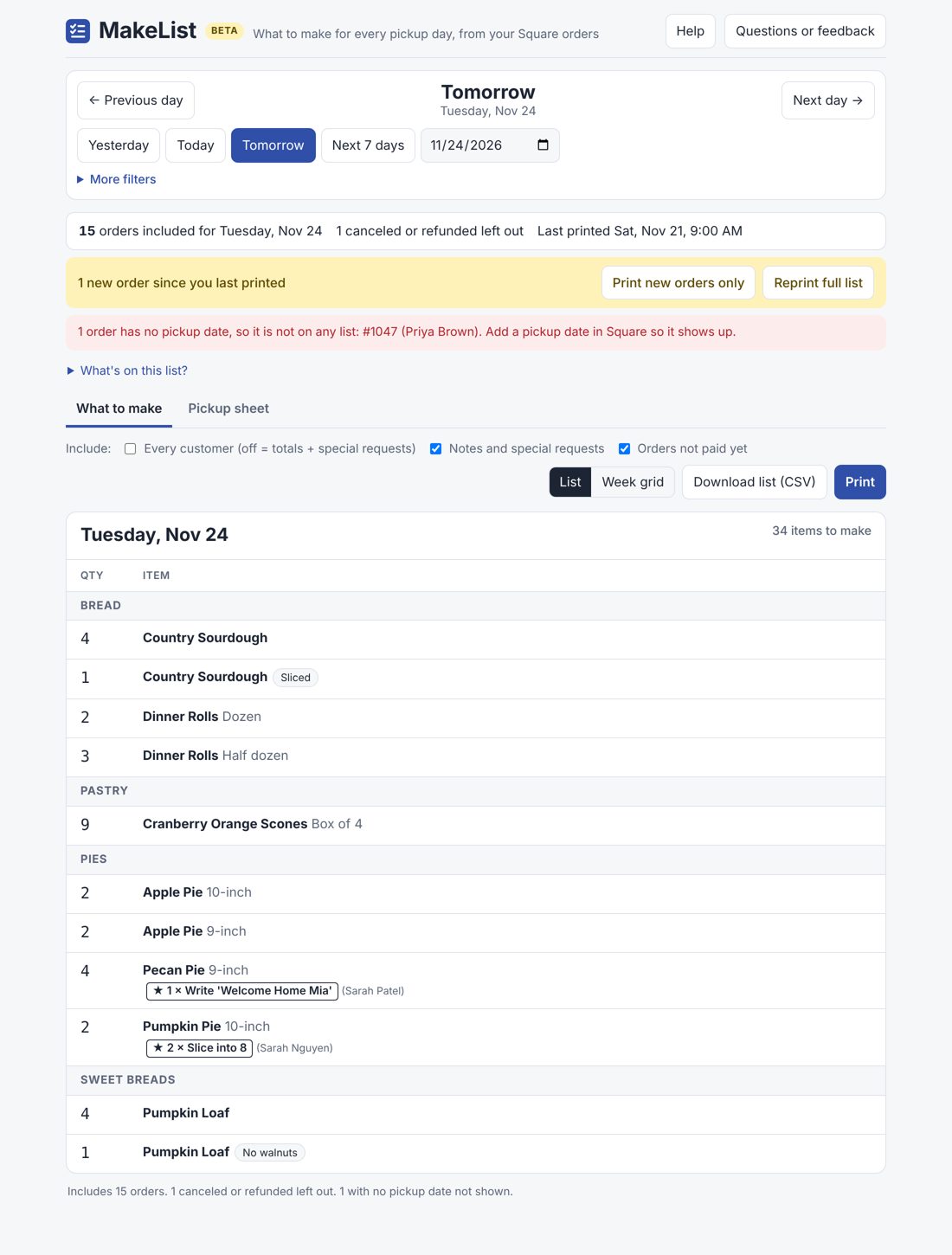
It also tells you when an order comes in after you've already printed a day, so you can print just the new ones. And it flags orders that have no pickup date at all, which otherwise never show up on any day.
Not just bakeries
Same problem, different kitchen: florists before Valentine's Day, caterers, meal-prep services, butchers at the holidays. If you take orders on Square for a future pickup date, MakeList totals them by day.
Questions
Does Square have a production report for pre-orders?
Not as of late 2026. Bakers on the Square Community have asked for one since at least 2021.
Can MakeList change my Square orders?
No. It only has read-only access to orders and item categories.
Does it work with Square Online pre-order items and orders scheduled at the register?
Yes. Any Square order with a pickup or delivery date shows up on that day's list.
How much does it cost?
Free during the beta. US Square accounts only for now.
Something missing?
Email [email protected]. We read everything.